

XSplit Broadcaster: March 2026 Update

Updated: Apr 1
The March 2026 update for XSplit Broadcaster is focused on one thing: making the app feel easier to use as streaming workflows get more complex.
A lot of creators are no longer working with just one canvas or one output. More setups now involve different layouts, vertical format streaming and platform-specific steps before going live. We wanted Broadcaster to better reflect that.
Bringing key controls closer
One of the biggest changes in this release is the UI update around the Stream and Record controls. These actions now sit closer to the main working area, which makes more sense when you are actively building scenes, managing outputs or preparing to go live.

We also updated the top bar so assigning channels to the main Stream button feels more direct and consistent especially in Multi Output Mode.
If you have been using older versions of Broadcaster, here is the quickest way to understand what changed:
The main Stream and Record controls have moved. They now sit above the Source List instead of around the old Scene name area.
The Output menu in the top bar now handles stream assignment. This is where you choose which channels are linked to the main Stream button.
The Broadcast menu now follows the same logic as the Output menu. It is no longer used to start streams directly. This was changed to keep the workflow consistent across the interface.
Streams are now started using the main Stream button. Once your channels are assigned, that button is the main way to go live.
The Record toggle in the top bar chooses which canvases will be captured by the main Record button.
The Record menu still works the same way. If you are a power user who creates recordings for specific scenes or uses more advanced recording setups, that workflow is still there.
Scene renaming has moved. Since the old Scene name bar has been removed, scenes are now renamed by right-clicking the relevant Scene button.
A more natural Preview Editor workflow
The other major change is the revamped Preview Editor.
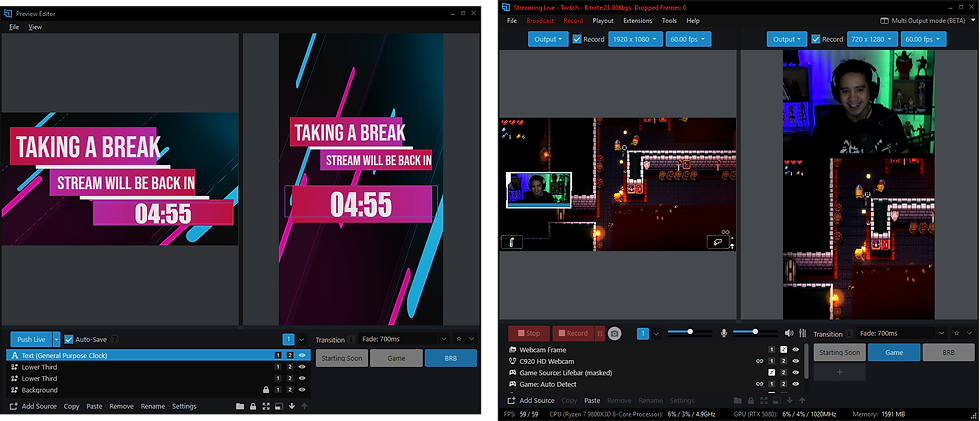
This replaces Split Mode with a workflow that feels more in line with the rest of Broadcaster. Scene switching now works the same way as it does in the main window, which helps make the editing flow more natural.
The goal was to make Preview Editor feel less like a separate mode with its own rules and more like a proper extension of your main production workflow.
Other XSplit Broadcaster updates in this release
Beyond the UI and workflow changes, this release also adds a few practical updates:
The YouTube Live plugin now supports adding thumbnails in-app and Dual Stream is available for eligible users.
Twitch stream details can now be edited in-app before going live.
Automatic Background Removal also now works with both NDI and Webpage sources.

Taken together, these changes are all part of the same direction: making XSplit Broadcaster easier to work with as modern live streaming keeps evolving.
We’d also love to hear what you think about these changes. Share your feedback in the comments, in our Discord, or through the Support chat.



Comments